Launch your own creator platform.
Your brand. Your domain. Subscriptions, paid content and private chat. No Nexfan revenue share.
What's inside
The tools to run your platform.
Explore your chat workspace, dashboard, payments and team tools.
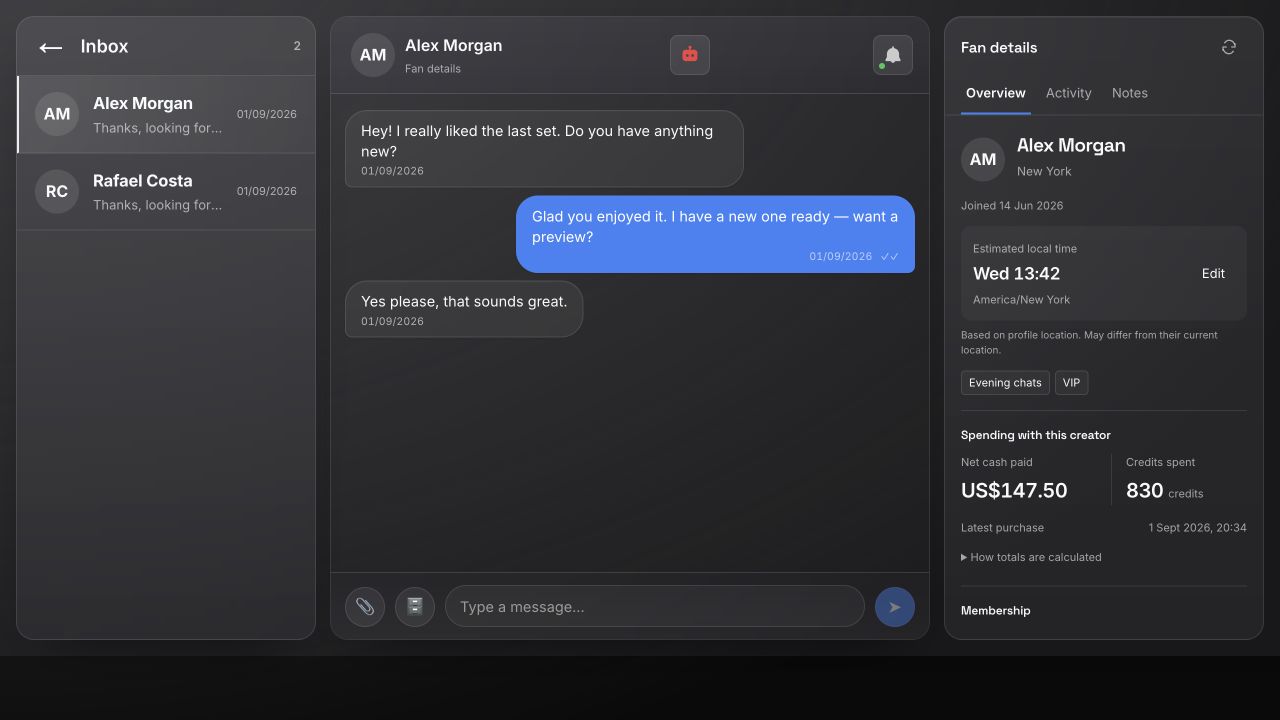
Pick up where the last chat left off.
Keep the conversation beside the fan’s profile, membership and purchase history.
In practice
Before replying, check previous purchases and private team notes. See local time when timezone information is available.
Fan context is private to the authorized creator team.
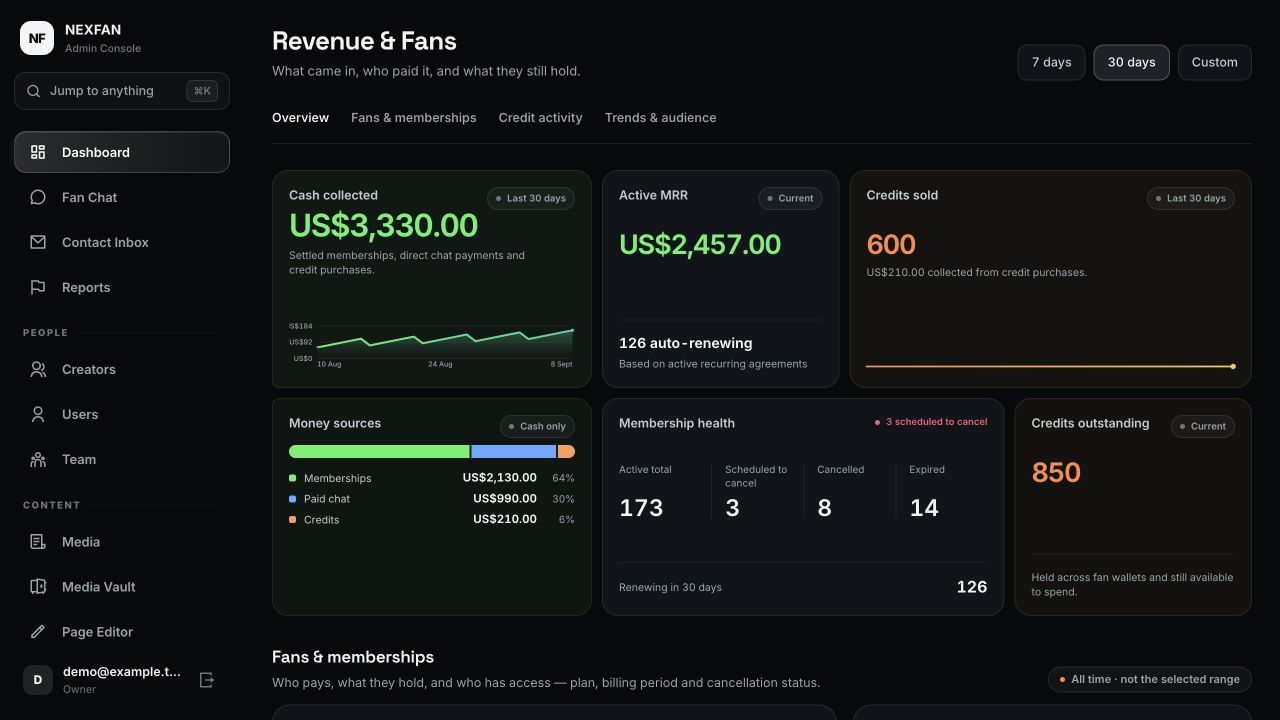
Know what came in.
See cash collected, active memberships and credit activity without treating credits spent as new cash revenue.
In practice
Review the last 30 days, then inspect fan payments and membership status from the same dashboard.
Figures shown are synthetic examples, not earnings claims.
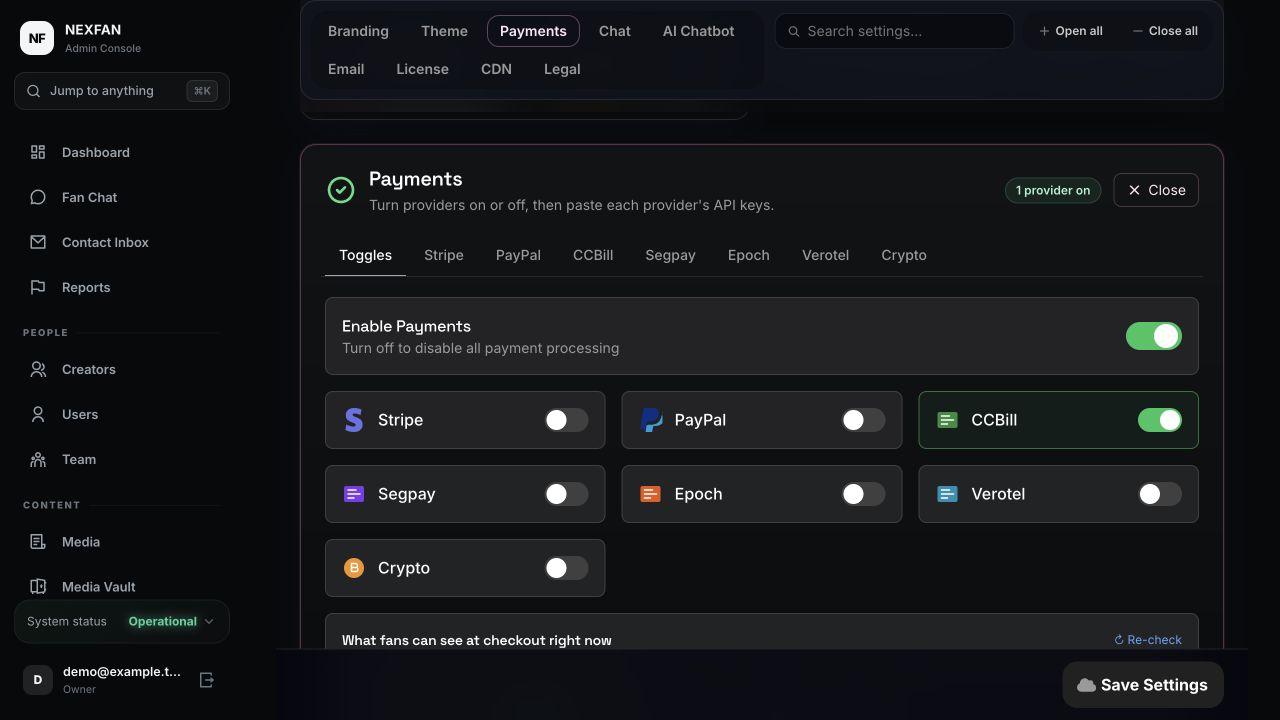
Connect your own payment accounts.
Choose supported providers from the admin panel. Payments go to your own processor accounts.
In practice
Enable a provider, add its credentials and check whether it is ready to appear at checkout.
Provider approval, fees and content rules apply. Nexfan does not guarantee acceptance.
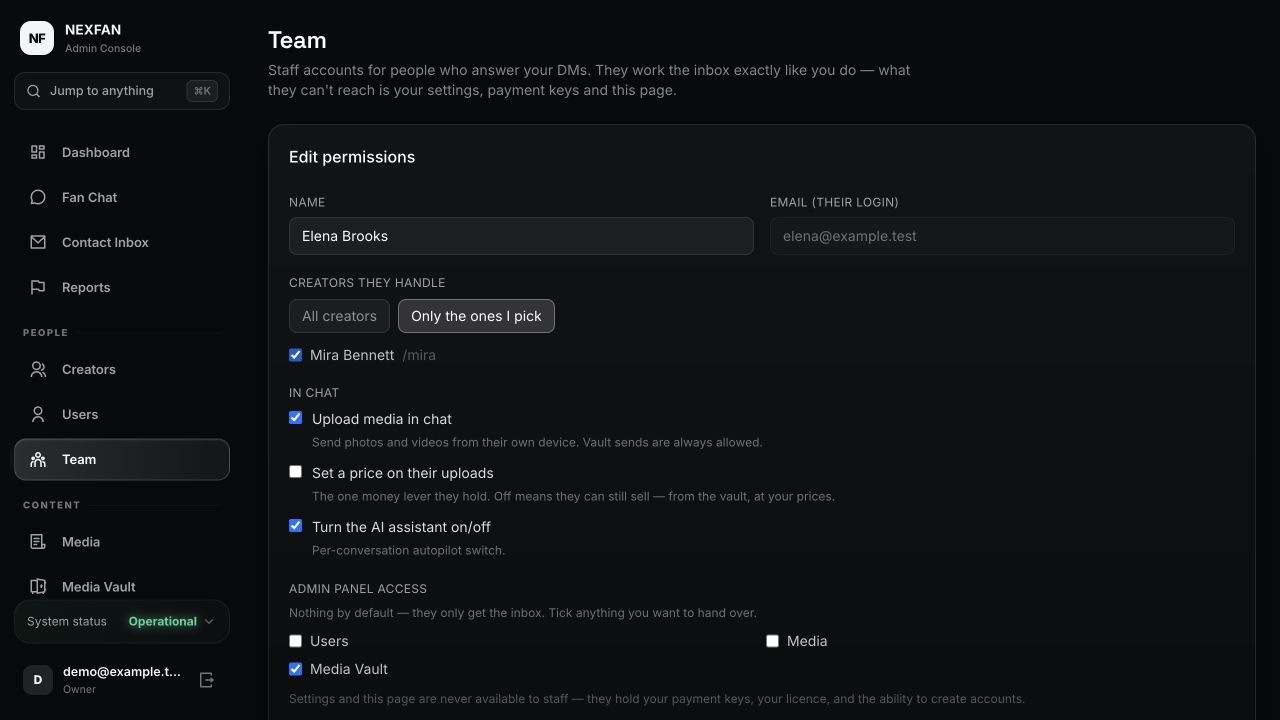
Hand over the inbox. Keep control.
Give chatters their own accounts and access to the creators they handle.
In practice
Let a teammate send content from the vault while keeping upload pricing and sensitive settings under your control.
Team accounts are included with Studio and Agency.
The full feature list — by categoryOpen
Making money
- Subscription memberships
- Pay-per-view posts
- Locked media inside DMs
- Timed paid chat, billed per interval
- Tips on posts, chat media and gallery
- Credits and wallet
Chat & DMs
- Live 1:1 chat
- Locked pay-per-view messages
- Price any upload per message
- Spam and abuse guard
- Moderation and reporting
The AI
- Writes in your style
- OpenAI, OpenRouter, Groq or DeepSeek — your key
- Vision: it reads photos fans send
- Per-fan conversation memory
- Optional "AI reply" disclosure
Content & video
- Adaptive HLS streaming
- Expiring signed video links
- Reusable content vault
- Drag-and-drop page editor
- Your own branding
Payments
- CCBill, Segpay, Verotel, Epoch
- Crypto, Stripe and PayPal
- Paid into your own accounts
- Switch providers in settings
- Refund and chargeback tracking
Security
- Chat encrypted at rest
- Two-factor authentication
- Revocable logins
- Photo metadata stripped on upload
- GDPR export and legal pages
Running it
- One-command install
- Update button in the admin panel
- Automated database backups
- Installs as a phone app, with push
- Analytics dashboard
- One to unlimited creators
- Team seats, scoped per creator
What you can sell
More than one way to get paid.
Monthly access, locked posts, private photos and videos, tips. You choose what to sell and set every price — and each payment goes straight into your own payment account.
Subscriptions
Set a monthly price and choose what members get for it.
Locked posts
Put a price on a single post, photo or video.
Paid messages
Send private photos and videos that fans pay to unlock.
Tips
Let fans send extra on posts and during conversations.
Every price is yours to set. NEXFAN never takes a cut of any of it.
Why own it
Stop renting your business
Hosted platforms take 10–20% of everything, hold your audience, and can close your account under their policies. Self-hosting gives you more control, with responsibility for your own infrastructure and providers.
More control over your business
Use your own domain and hosting, and choose your payment providers. You control your installation; hosting rules, payment-provider requirements and NEXFAN licence conditions still apply.
You own the data
Members, messages, media and analytics all live in your database. Export it, back it up, move hosts. It's yours in the way a rented account never is.
| Renting (Patreon, OnlyFans, Fanvue…) | NEXFAN (self-hosted) | |
|---|---|---|
| Cut of your earnings | 10–20%, forever | 0% |
| Ongoing cost | A share of everything you make | Hosting estimate: $20–40/mo for a starter VPS; usage and services cost extra |
| Who holds the payout | The platform pays you | Your own processor account |
| Deplatforming risk | At their discretion | You control the server |
| Your audience & data | Locked inside their platform | In your own database |
| Branding & domain | Their brand, their URL | Your brand, your domain |
| Custom look | Take it or leave it | Drag-and-drop page editor |
A platform taking 20% of $10,000 a month takes $24,000 a year. Every year, for as long as you keep earning.
NEXFAN TAKES NONE of it!
Getting started
From your server to your own site.
Install on a supported Linux VPS, then configure branding, content and payments in your admin panel. You remain responsible for your server, security and backups.
- 1
Get your licence
Your key is on screen and in your inbox the moment payment clears. Nobody approves it by hand.
- 2
Run one command
On a supported fresh Linux VPS, paste the install line with your key and domain. It installs Docker, pulls the app and issues HTTPS itself.
- 3
Make it yours
Set your branding, connect a payment provider, publish. You can be taking money as soon as your processor approves you.
Before you start: have a supported Linux VPS, a domain pointed at it and a suitable payment-provider account. Need help choosing? Ask Nexfan before buying.
Illustrative installation: paste the Nexfan install command with your licence and domain; download application layers, start containers, and issue HTTPS. Your site is live. Demo timing is shortened.
Choose your licence
One payment.
Buy it once and it's yours to run, with 12 months of updates included. Compare creator limits, team access and support below.
Each licence covers one production installation. Hosting, domain, processing, media storage and transfer, email and optional AI services cost extra.
After the included update period, your installed version keeps working under the licence terms. Renewal and creator-limit upgrade prices are not listed here; contact Nexfan for a quote before buying. Support is included during your active update period.
All sales are final — see the terms of sale.
Talk to the person behind Nexfan.
Questions about your server, payment provider or which licence fits? Ask before you buy.
Know what support covers.
Support is included during your active update period. Agency includes priority support.
You remain responsible for hosting, server security and backups. Ask about installation help or custom work before purchasing.
FAQ
Questions
If yours isn't here, ask me directly — I'd far rather answer everything up front than take money from someone it isn't right for.
The product
What is NEXFAN?
A complete, self-hosted creator membership platform you install on your own server with one command. Subscriptions, pay-per-view, paid chat, tips, video streaming and a built-in AI. You buy a licence once and run it yourself.
Is it a SaaS or something I host myself?
You host it. You buy a licence and run it on a server you rent, under your own domain. We're not in the loop on your traffic, your fans or your money — the only thing our side does is check your licence and serve you updates.
Do I get the source code?
You get the full, ready-to-run application — not an editable source bundle. In practice that's the part most owners care about: you run it on your own server and own your database, domain and data, while hosting rules, payment-provider requirements and licence conditions still apply. Need something the settings and page editor don't cover? I take on custom work.
Can I run more than one creator?
Yes. Your tier sets the number of creator accounts — one, five, or unlimited — all under a single install, with earnings tracked per creator. Fans, subscribers and revenue are never capped; only the creator count is. Studio and Agency also let you add team members with their own logins, each given access only to the creators you choose.
Does it work on a phone?
Yes. The site installs to the home screen as an app and supports real push notifications, including on iPhone — which most web apps can't do. Your fans get an app-like experience with nothing to download from an app store.
Money
Do you take a percentage of what I earn?
No. You connect your own payment processor, so fans pay you directly and we never see the transaction. The only cut anyone takes is your processor's standard card fee, which you'd pay anywhere.
How much does it cost to run in total?
The licence is a one-time payment. Budget roughly $20–40/month for a starter Linux VPS with about 4 GB RAM; this is an estimate, not a capacity or performance guarantee. Domain, payment processing, media storage and transfer, email, optional AI APIs and administration are separate. Future updates may require paid renewal; ask for current renewal and creator-limit upgrade pricing.
Which payment processors are supported?
Seven. Providers for higher-risk businesses include CCBill, Segpay, Verotel, Epoch and crypto. Stripe and PayPal are also supported, but their terms restrict a lot of content and they close accounts over it — read them before you build on either. You can run several at once and switch in settings.
Will my payment processor drop me?
It's a real risk on mainstream processors — which is exactly why NEXFAN doesn't hard-wire itself to one. Connect a high-risk specialist as your main one and keep others as backups, to reduce reliance on one account. Approval, availability and payment continuity are not guaranteed.
What's your refund policy?
Because a licence is delivered instantly as a key that unlocks downloads, sales are final. Ask me anything before you buy — that's what I'm here for.
Running it
Do I need to know how to code?
No coding is required for installation and normal configuration. Your admin panel handles branding, pricing, payments and content; server maintenance, security and media backups remain your responsibility.
What kind of server do I need?
A Linux VPS with roughly 4 GB of memory and a domain pointed at it. DigitalOcean, Hetzner, Vultr or Contabo all work. Budget $20–40 a month for hosting — separate from the licence and paid to your host, not to us.
What happens when there's an update, and for how long?
An Update button appears in your admin panel. Press it and your install upgrades itself in place, without re-running the installer. Plan for a maintenance window. Every purchase includes 12 months of updates. After that you can renew for another year — and if you don't, your install simply keeps running on the version you have. Continued use remains subject to the licence terms.
How do backups work?
The automatic backups cover the database — members, messages, payments, posts and settings. Your uploaded photos and videos live on disk and are deliberately left out, because media is large and already stored on the server. Keep your own copy of the media folder, or sync it to object storage, so you have both halves.
Can I move it to another server later?
Yes. Your licence isn't tied to a machine. Run the installer on the new server, restore your database backup, copy your media folder across, repoint the domain, and you're back — no new purchase. Don't skip the media step: the database backup alone won't bring your photos and videos with it.
Is it legal to run a platform like this?
In most places, yes, with responsibilities: age and identity checks for creators, following your processor's rules, and data-protection law. NEXFAN ships the compliance tooling — legal/consent pages, GDPR export, moderation and reporting — but the law depends on where you and your creators are, so check with a lawyer for your situation.
What support do I get?
Me, directly, on Telegram or WhatsApp. The roadmap genuinely follows what buyers ask for, so tell me what's missing and it gets considered.
Who you're buying from
Stop renting your audience.
One software licence. No NEXFAN platform commission.